Event AI

inwink’s event AI and your own AI, together on one platform.

  • To personalize the experience.
  • To produce your content.
  • To analyze your events.
  • To build your own tools.

The AI built into inwink and the AI assistant your teams already use work on the same data.

Onglet : Experience

Étiquette : inwink AI

App › Recommended for you

  • AI in retail Session, 9:30 am 96%
  • Booth B42 Exhibitor, checkout solutions 91%
  • Claire, Head of Innovation 3 shared interests 88%

Onglet : Content

Étiquette : inwink AI

Emails › Registration launch campaign

We are pleased to inform you that registration for our event is now open on our website.

  • Generate
  • Rephrase
  • Shorten
  • Translate

Registration is open. Book your badge today.

Onglet : Analysis

Étiquette : Your AI

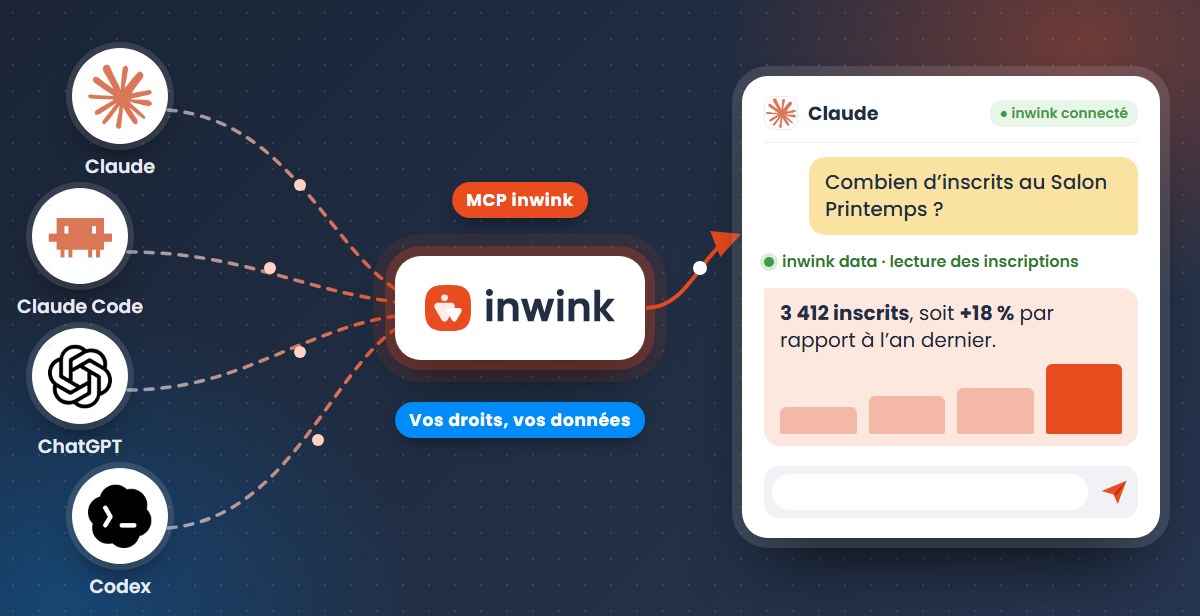
Claude or ChatGPT, connected to inwink

Compare registrations with last year, at the same date.

inwink data: reading registrations

3,412 registrants, up 18%.

  • J-30 : 40
  • J-21 : 55
  • J-14 : 62
  • J-7 : 90

Onglet : Tools

Étiquette : Your AI

Claude or ChatGPT, connected to inwink

Build a screen to approve registration requests.

inwink extensions: creating the extension

✓ Extension published in your inwink back office

What is event AI?

Event AI covers the artificial intelligence features that support an event before, during and after: writing and translating content, personalized recommendations, pre-filled exhibitor profiles and performance analysis. It serves organizers, attendees and exhibitors alike, and every suggestion is subject to approval: nothing is published without your consent.

  • ✍️Create faster Copy, translations, visuals, content.
  • 📊Make better use of your data Ask your events your questions directly.
  • 🧩Build what you’re missing Turn a business need into an inwink tool.

AI is already built into inwink

No need to add yet another tool to your day. AI works directly inside inwink websites, apps and back office to speed up your event preparation and improve your attendees’ experience.

Event Experience

AI for the attendee and exhibitor experience

Before

  • Complete attendee profiles
  • Pre-fill exhibitor profiles
  • Make content and people easier to discover

During

  • Recommend relevant sessions
  • Suggest exhibitors and people to meet
  • Make it easier to connect
  • Answer frequently asked questions from the website or the app

After

  • Recommend relevant replays and content
  • Extend the conversations started during the event

Event Marketing

AI for marketing and communications

Before

  • Generate and improve copy, emails and descriptions
  • Translate the website and the agenda
  • Create visuals
  • Proofread and harmonize content

During

  • Write the day’s announcements and reminders quickly
  • Adapt them into several languages

After

  • Turn sessions into new content
  • Prepare the next edition’s communications faster

Event Performance

AI to run sales and operations

Before

  • Less data entry thanks to pre-filled exhibitor profiles
  • Fewer reminders thanks to completed profiles

During

  • Track engagement, meetings and leads
  • Fewer requests thanks to the attendee assistant

After

  • Analyze performance
  • Prepare the next edition faster

And your own AI assistant can work with inwink too

Your teams already use an AI assistant? Connect it to inwink and ask it for what you need, in your own words.

  • Analyze your events Available
    Query your event data easily by chatting with your AI.
  • Build your own tools Available
    Turn a need into an inwink extension.
  • Build your websites Coming soon
    Edit your pages through conversation.

Discover the inwink MCP

  • Claude
  • Claude Code
  • ChatGPT
  • Codex
  • Other MCP-compatible assistants

Fenêtre : Claude or ChatGPT, connected to inwink

How many registrants do we have for the Spring Show, compared with last year at the same date?

inwink data: reading registrations, 2025 and 2026 editions

⎿ 2 events, 6,420 registrations analyzed

You have 3,412 registrants, up 18% on the same date last year. Trade visitors show the strongest growth.


Build a screen so our co-organizer can approve registration requests, without access to the rest of the back office.

inwink extensions: reading registration requests

inwink extensions: creating the “Registration approval” extension

⎿ Version 1 ready to test

✓ Extension published in your inwink back office

The connection uses the MCP open standard: your assistant works with your account, within the limits of your permissions.

Already in real use

VivaTech inwink AI In production

“Thanks to AI, attendees receive relevant recommendations for sessions to attend and people and/or exhibitors to meet, while making it easier to get in touch.”

François BitouzetFrançois Bitouzet
Managing Director, VivaTech

IPEM Global Paris Open MCP In production

“We were able to build it in two and a half to three hours with the inwink MCP. It’s going to make our lives easier.”

Gauthier HutteauGauthier Hutteau
Lead Product, IPEM

Maison&Objet Open MCP Workshop prototype

“We managed to build the performance tracking dashboard in under two hours. We usually do it by hand, and it takes us quite a while.”

Anne-Laure Helleouet DhazeAnne-Laure Helleouet Dhaze
Maison&Objet

What sets the inwink approach apart

What you see on the market What inwink offers
Built-in AI or a connector open to your assistant Both: inwink AI for your attendees and teams, and a connection for your own AI
A single AI model, chosen by the vendor Several models combined, replaced as soon as a better one appears, and the freedom to plug in your own AI
AI features announced for the coming months Already in production, at the scale of events with 200,000 visitors
A connector focused on viewing or editing data Three uses: analyzing your events, building your own tools and building your websites
AI-generated websites and tools that you host and maintain yourself Everything stays in inwink: websites previewed before publishing, extensions published in your back office, with versioning
A single access to the entire platform Separate access for each use, easy for your IT department to review
A connector you have to figure out on your own Support: training, a practical guide, a dedicated CSM

Trust

AI that respects your data

AI should save you time, never cost you control over your data or your attendees’ data.

🚫

No training by inwink

inwink does not train any model on your data. With your own assistant, the policy of your Claude or ChatGPT account applies.

🔐

Your permissions, nothing more

Your assistant connects with your account and only sees what you see.

🧭

Separate access for each use

Analyzing, building a tool and building a website each go through separate access, so the scope is always clear.

👁️

You approve before publishing

Website changes are made in preview. Nothing goes live without your approval.

Go further

Attendees at an inwink AI workshop

Oct 15

AI workshop

A day to build your first tool

Come with a problem, leave with a solution, even without a technical background.

Save my seat

Claude, Claude Code, ChatGPT and Codex connected to inwink through the MCP

MCP guide

AI in inwink: build your own tools

The method, six real customer cases and everything you need to get started.

Download the practical MCP guide

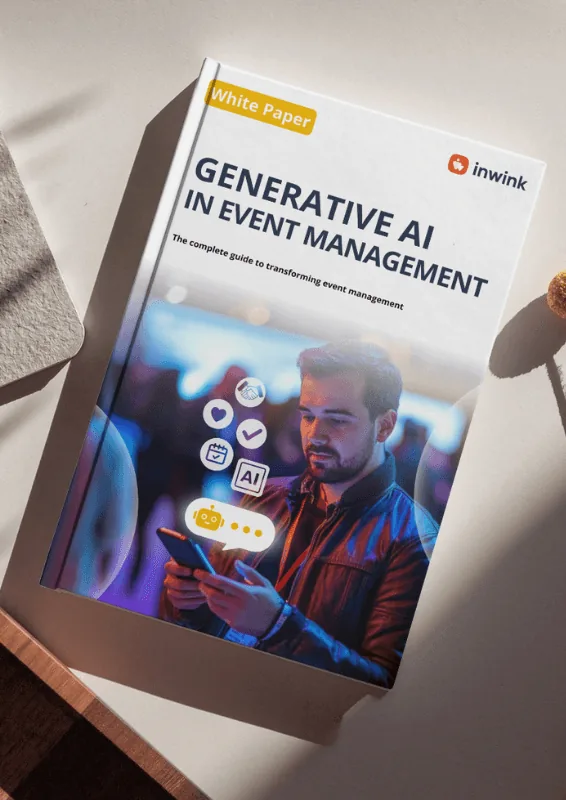
White paper: generative AI for events

White paper

Generative AI for events

Uses, challenges and best practices for organizers.

Download the generative AI white paper

Frequently asked questions

Data and security

Is my data used to train AI models?

inwink does not train any AI model on your data. For the built-in AI, models are used through professional plans whose terms exclude training. When you connect your own assistant, the data it accesses follows the policy of your Claude or ChatGPT account: professional plans (Team, Enterprise, Business, API) do not train models by default, whereas individual plans allow it by default, with an option to turn it off.

Where is my data processed, and is it GDPR compliant?

Your data remains hosted on inwink’s infrastructure, which is subject to the GDPR. When you connect your own AI, the assistant you choose also applies its own data policy, which your security team can review separately.

Does my AI assistant have access to my entire inwink account?

No. It connects with your account and is limited to the permissions assigned to you. Each use (analyzing, building a tool, building a website) goes through separate access.

Do I have to use AI?

No. You choose the features you want to use. Your own assistant only accesses inwink if you decide to connect it, and nothing is published on your websites without your approval.

AI day to day

What can AI do in an event management platform?

Personalizing the attendee and exhibitor experience (recommendations, assistant, introductions), producing and translating content, analyzing an event’s results and, with your own assistant connected through the MCP, building custom tools.

How does AI change the way my team works?

It takes care of repetitive tasks (writing, translating, compiling figures, preparing a report) and gives you time back for what matters: the attendee experience, relationships with exhibitors and partners, editorial choices. Your team always makes the final call.

Which AI models does inwink use?

inwink AI combines several models, each used for what it does best: writing, translation, images, recommendations. We can switch as soon as a better-performing model appears, with nothing changing on your side.

Do I need to know how to code?

Not to query your data or describe the need you want to solve. Building extensions requires a one-time setup on the workstation. Your IT team can handle it, and your CSM can support you.

Which AI assistants are compatible?

Assistants that support the MCP protocol, including Claude and ChatGPT.

How can we get support to get started?

Through training, the practical guide, and your CSM, who helps you identify the first useful uses for your team.

See what AI can really do for your events

A demo often says more than a list of features.